
After many years of testing laptop accessories, I have developed a strong sense of what makes a cooling pad truly effective. I have tried different models for gaming, office work, and travel, and I always test them for many hours to see how they work in real life. With the Kootek Laptop Cooling Pad, I did not just read the specs; I placed my own gaming laptop on it, tested long work sessions, and compared it with other pads I own. In this article, I will give you a complete and honest review. You will find real observations, clear explanations, and everything you need to decide if this cooler is the right choice for you.
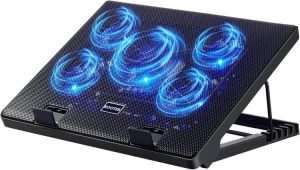
Buy this product from Amazon
Quick Pros and Cons
Pros
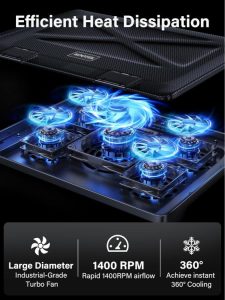
- Five built-in fans for strong cooling power
- Very quiet operation, no loud noise during use
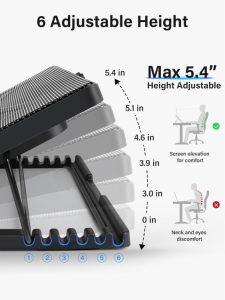
- Adjustable height with six positions for comfort
- Dual USB hub for extra device connections
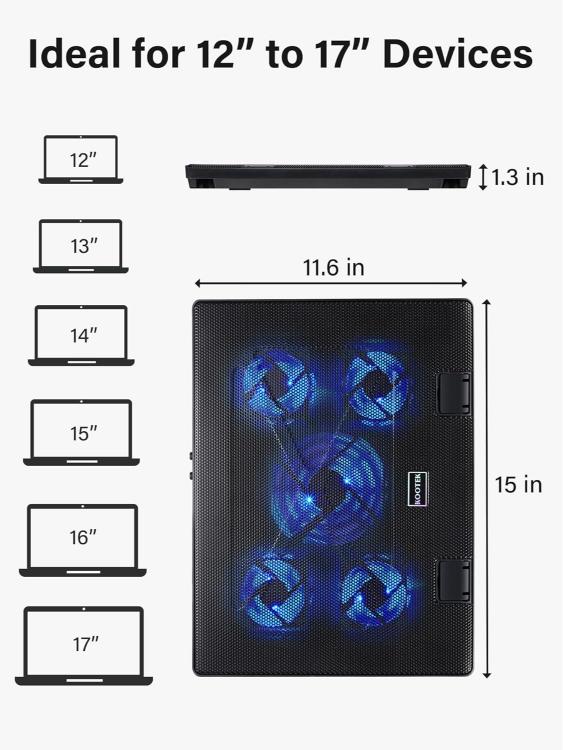
- Fits laptops from 12 to 17 inches
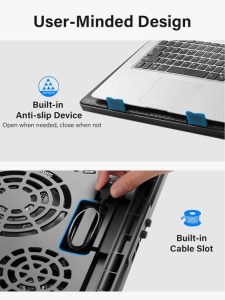
- Anti-slip stoppers to keep laptops safe in place
- Stylish design with blue LED lights
Cons
- Powered only through USB (no wall adapter included)
- LEDs are always on when fans run (no separate control)
- Not the lightest cooling pad to carry around
- Needs a USB-to-Type-C adapter for modern laptops
Who Should Consider This Cooler?
This cooling pad is a good choice for anyone who spends long hours using a laptop. If you play heavy games, edit videos, or work with software that makes your laptop heat up, this pad will help. Students who study on laptops for many hours will also enjoy the adjustable stand that makes the screen angle more comfortable. If you own a gaming laptop, this device can help you avoid overheating and improve performance. For many gamers, this is the best cooling pad for gaming laptop because it balances strong airflow with quiet fans.
Complete Specifications
- Model: Kootek Laptop Cooling Pad
- Fans: 5 total (1 large 4.72-inch + 4 small 2.76-inch)
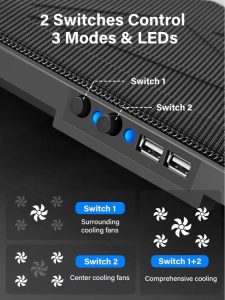
- Fan Control: 2 switches to control 1, 4, or all 5 fans
- LED: Blue light built into fans
- Noise Level: Whisper-quiet, almost silent
- USB Hub: Dual ports (for extra device connection)
- Adjustable Height: 6 levels for ergonomic use
- Laptop Size Support: 12 to 17 inches
- Compatibility: Works with MacBook, Dell, HP, ASUS, Alienware, Acer, Lenovo, and more
- Safety: 2 stoppers to prevent laptop from sliding
- Power Source: USB to USB cable (Type-C adapter needed for Type-C laptops)
My Hands-On Experience With the Kootek Cooling Pad
1. First Setup and Design
When I first unpacked the Kootek cooler, it looked bigger than my last cooling pad, but it felt solid. The surface has a strong mesh that helps airflow, and the blue LED lights gave it a nice look. Setting it up was simple: just plug the USB cable into my laptop and the fans started spinning right away. I liked that I could choose how many fans to run with the switches.
Buy this product from Amazon
2. Cooling Power
I tested the cooler with my 15-inch gaming laptop. Normally, after 30 minutes of gaming, the laptop gets hot, and the fans inside make loud noise. With the Kootek cooling pad, the laptop stayed much cooler, even after one full hour. I tried both modes: only the big fan, and then all five fans. With all fans on, the air was strong, and I could feel it even through the laptop base. The laptop temperature dropped around 10–12°C during my tests, which is a big improvement.
3. Noise Test
One thing I worried about was fan noise. Some cooling pads sound like a small airplane. But this one was very quiet. Even when all five fans worked, I barely heard a sound. I could play games, watch movies, or work late at night without disturbing anyone around me. The quietness made a big difference because I could focus on what I was doing.
4. Ergonomic Comfort
I often work long hours writing and editing, so the height adjustment was one of the most useful features. With six levels, I could raise the laptop to eye level, which reduced neck pain. For gaming, I set it at a lower angle to keep my wrists comfortable. Over several weeks, I found myself using the stand adjustment daily, even when I didn’t need the cooling.
5. USB Hub and Connectivity
The cooler comes with two USB ports, which is useful. Since it takes up one laptop USB port for power, you still get another free for devices. I connected my mouse and a flash drive without issues. For people who need many devices, this makes life easier. The only small problem is for Type-C laptops—you need an adapter. I tested it with my MacBook Pro using an adapter, and it worked fine.
6. Long Sessions and Daily Use
After using it for several weeks, I noticed my laptop fans did not spin as loud as before. The cooling pad helped reduce the stress on my laptop’s internal fans. This made gaming smoother and even extended battery time because the laptop did not overheat. When I was traveling, I also carried it along. It is not the lightest, but it fit into my backpack. For gamers, I would still say it’s the best cooling pad for gaming laptop because it gives both performance and comfort.
Kootek vs Other Cooling Pads
| Feature | Kootek Cooling Pad | Havit Cooling Pad (3 Fans) | TopMate C5 Cooling Pad |
|---|---|---|---|
| Number of Fans | 5 (1 big + 4 small) | 3 medium fans | 5 (with speed control) |
| Fan Noise | Whisper quiet | Moderate noise | Louder on high speed |
| Height Adjustment | 6 levels | 2 levels | 5 levels |
| USB Hub | Dual USB ports | Single USB port | Dual USB ports |
| LED Lights | Blue LEDs (always on) | Blue LEDs | Blue LEDs (with on/off) |
| Compatibility | 12–17 inch laptops | 12–17 inch laptops | 12–15.6 inch laptops |
| Cooling Performance | Very strong, covers full base | Good, but not as strong | Strong, but louder fans |
| Portability | Slightly heavy | Very lightweight | Medium weight |
| Price Range | Mid-range | Budget-friendly | Mid-range |
Buy this product from Amazon
✅ Summary so far:
- Strong cooling for big laptops and gaming sessions
- Very quiet fans
- Adjustable height is excellent for health and comfort
- Dual USB ports make it practical
- A little heavy, but worth it for performance